Custom Statuses
bd ships with five built-in statuses. You can add your own to match how your team actually works.
Prerequisites
- bd 1.1.0+ installed
- Beadbox 0.15.0+
- An existing workspace with at least one bead
Built-in statuses
Every workspace starts with these five statuses. They cannot be removed.
| Status | Description |
|---|---|
open | New or unstarted work |
in_progress | Actively being worked on |
blocked | Waiting on a dependency or external input |
deferred | Intentionally postponed |
closed | Done |
Adding custom statuses
One command. Pass a comma-separated list of status names:
bd config set status.custom "ready_for_qa,in_qa,qa_passed,ready_to_ship"That's it. The new statuses are available immediately in both bd and Beadbox.
Using custom statuses
Custom statuses work everywhere built-in statuses do:
Set a bead's status:
bd update bb-1234 --status ready_for_qaFilter by status:
bd list --status ready_for_qaList all beads in a custom state:
bd list --status in_qa,qa_passedHow it looks in Beadbox
Status dropdown
Custom statuses appear in the status dropdown on every bead, with color-coded dots. No restart required. As soon as you run the config command, new statuses show up the next time you open a bead.
Pipeline view
The Activity page shows a pipeline with one column per status, left to right. Custom statuses appear as additional columns between the built-in ones.
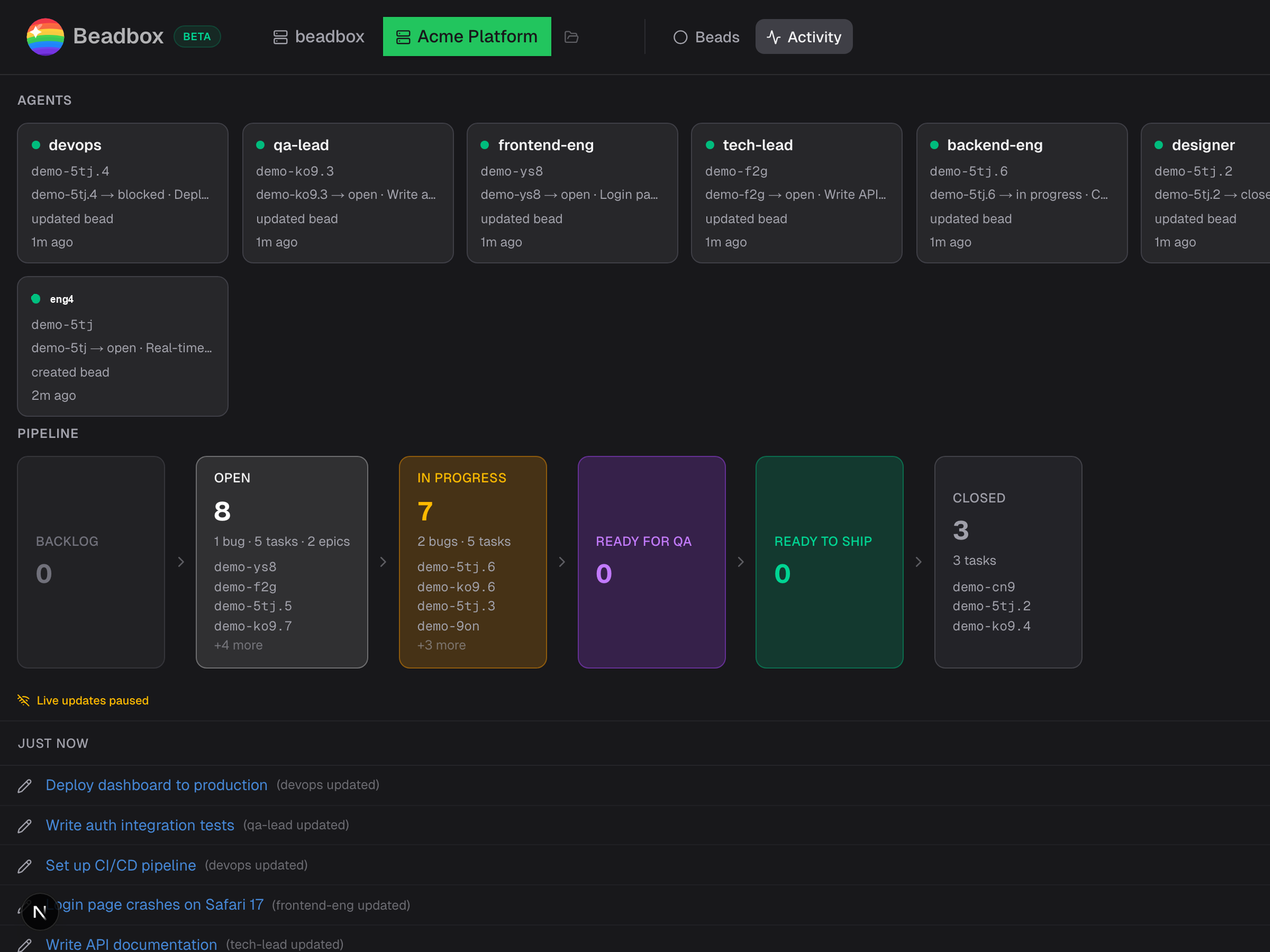
Note: Current limitation: the pipeline view supports a fixed set of column positions. Custom statuses appear in the dropdown and work with all CLI commands, but some may not have dedicated pipeline columns yet.
Removing or changing statuses
To change your custom statuses, run the config command again with the new list:
bd config set status.custom "ready_for_qa,qa_passed,ready_to_ship"To remove all custom statuses and go back to the five defaults:
bd config set status.custom ""Beads that already have a removed status keep that status. They still appear in bd list and Beadbox, and you can filter for them. You just can't assign the removed status to new beads.
Tips
- Use underscores, not spaces. Status names are identifiers. ready_for_qa works. "Ready for QA" does not.
- Order matters. The order you list statuses in the config determines their position in the pipeline view and dropdown. Put them in the order work flows through them.
- Keep the list short. Three to five custom statuses is the sweet spot. More than that and your pipeline view gets crowded.
- Name for your workflow, not for the tool. ready_for_qa, in_review, needs_deploy tell you what to do next. status_7 does not.